
- Operating system
- Windows 10 & 11
- Processors
- Intel & AMD
- Inbuilt spoofer
- No
- Game
- Rust
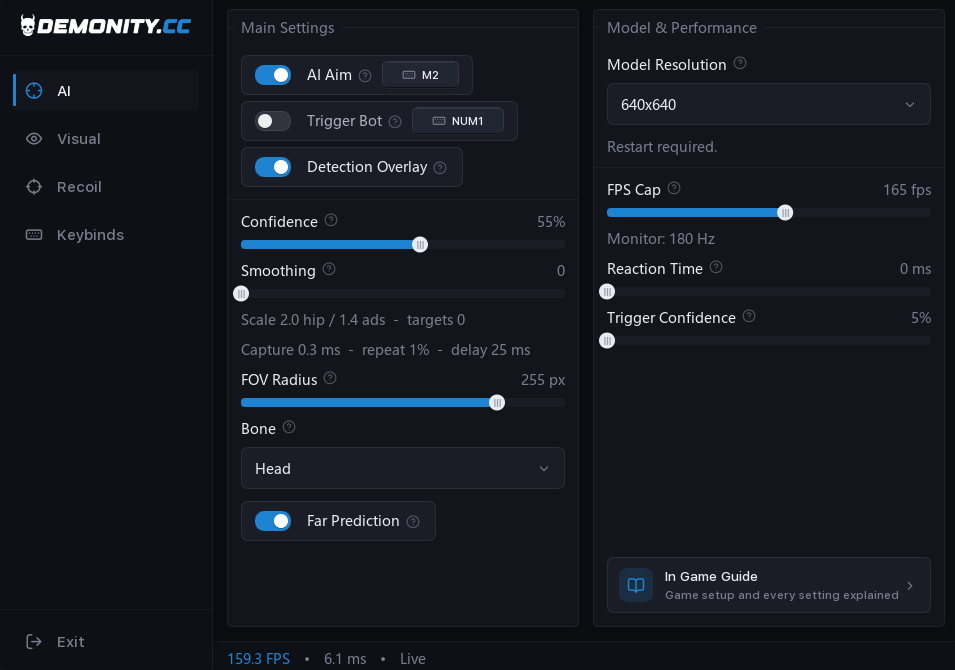
AI Settings
Main Settings:
AI Aim: Toggles automatic aim assist on/off (Assigned Key: Middle Mouse Button - M2).
Trigger Bot: Automatically fires when crosshairs are over a target (Assigned Key: NUM1).
Detection Overlay: Displays real-time AI target detections on screen.
Confidence Slider: Sets the minimum accuracy threshold for target detection (e.g., 55%).
Smoothing Slider: Controls how smooth or snappy the aiming movement is.
FOV Radius Slider: Determines the circular scan area for target acquisition (e.g., 255 px).
Bone Selection: Selects the target body part to aim at (e.g., Head).
Far Prediction: Predicts and adjusts aim for moving targets at a distance.
Model & Performance:
Model Resolution: Sets the resolution processed by the AI model (e.g., 640x640).
FPS Cap Slider: Limits the software's frame rate.
Reaction Time Slider: Adjusts the trigger bot's reaction delay in milliseconds.
Trigger Confidence Slider: Sets the required detection precision for the trigger bot to fire.
Main Settings:
AI Aim: Toggles automatic aim assist on/off (Assigned Key: Middle Mouse Button - M2).
Trigger Bot: Automatically fires when crosshairs are over a target (Assigned Key: NUM1).
Detection Overlay: Displays real-time AI target detections on screen.
Confidence Slider: Sets the minimum accuracy threshold for target detection (e.g., 55%).
Smoothing Slider: Controls how smooth or snappy the aiming movement is.
FOV Radius Slider: Determines the circular scan area for target acquisition (e.g., 255 px).
Bone Selection: Selects the target body part to aim at (e.g., Head).
Far Prediction: Predicts and adjusts aim for moving targets at a distance.
Model & Performance:
Model Resolution: Sets the resolution processed by the AI model (e.g., 640x640).
FPS Cap Slider: Limits the software's frame rate.
Reaction Time Slider: Adjusts the trigger bot's reaction delay in milliseconds.
Trigger Confidence Slider: Sets the required detection precision for the trigger bot to fire.
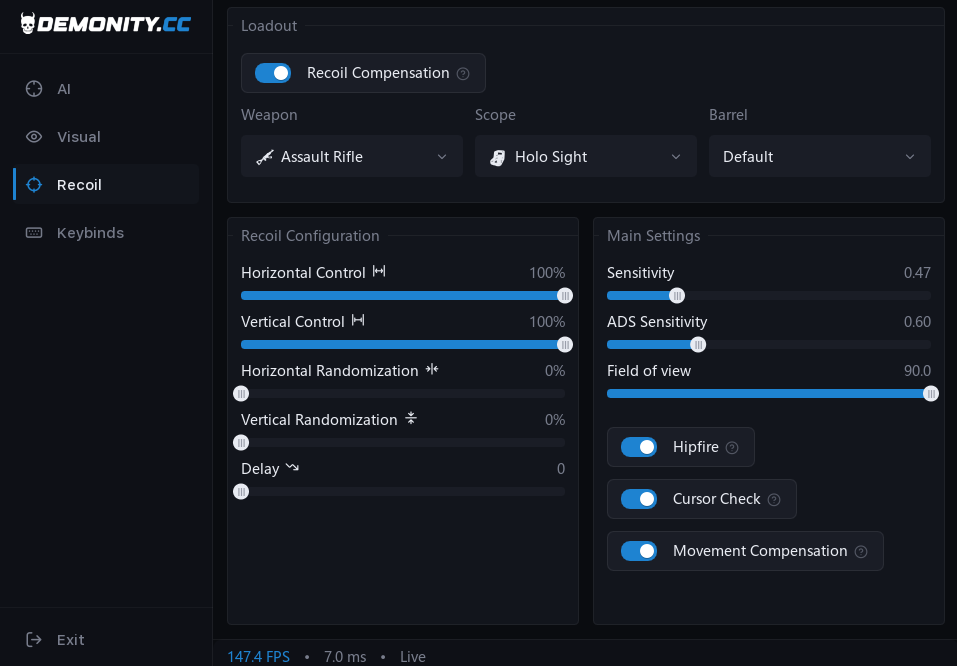
Recoil Settings
Loadout:
Recoil Compensation: Enables or disables recoil mitigation.
Weapon: Selects the active weapon profile (e.g., Assault Rifle).
Scope: Selects the attached scope type (e.g., Holo Sight).
Barrel: Selects the attached barrel mod (e.g., Default).
Recoil Configuration:
Horizontal Control Slider: Adjusts horizontal recoil compensation percentage (up to 100%).
Vertical Control Slider: Adjusts vertical recoil compensation percentage (up to 100%).
Horizontal Randomization Slider: Adds subtle randomization to horizontal control for a natural feel.
Vertical Randomization Slider: Adds randomization to vertical control.
Delay Slider: Sets the reaction delay before recoil compensation kicks in.
Main Settings:
Sensitivity Slider: Matches your in-game mouse sensitivity.
ADS Sensitivity Slider: Matches your Aim Down Sights sensitivity.
Field of View Slider: Matches your in-game FOV setting.
Hipfire Toggle: Enables recoil compensation during un-aimed firing.
Cursor Check Toggle: Disables recoil compensation while in-game UI menus are open.
Movement Compensation Toggle: Compensates for extra recoil introduced while moving.
Loadout:
Recoil Compensation: Enables or disables recoil mitigation.
Weapon: Selects the active weapon profile (e.g., Assault Rifle).
Scope: Selects the attached scope type (e.g., Holo Sight).
Barrel: Selects the attached barrel mod (e.g., Default).
Recoil Configuration:
Horizontal Control Slider: Adjusts horizontal recoil compensation percentage (up to 100%).
Vertical Control Slider: Adjusts vertical recoil compensation percentage (up to 100%).
Horizontal Randomization Slider: Adds subtle randomization to horizontal control for a natural feel.
Vertical Randomization Slider: Adds randomization to vertical control.
Delay Slider: Sets the reaction delay before recoil compensation kicks in.
Main Settings:
Sensitivity Slider: Matches your in-game mouse sensitivity.
ADS Sensitivity Slider: Matches your Aim Down Sights sensitivity.
Field of View Slider: Matches your in-game FOV setting.
Hipfire Toggle: Enables recoil compensation during un-aimed firing.
Cursor Check Toggle: Disables recoil compensation while in-game UI menus are open.
Movement Compensation Toggle: Compensates for extra recoil introduced while moving.
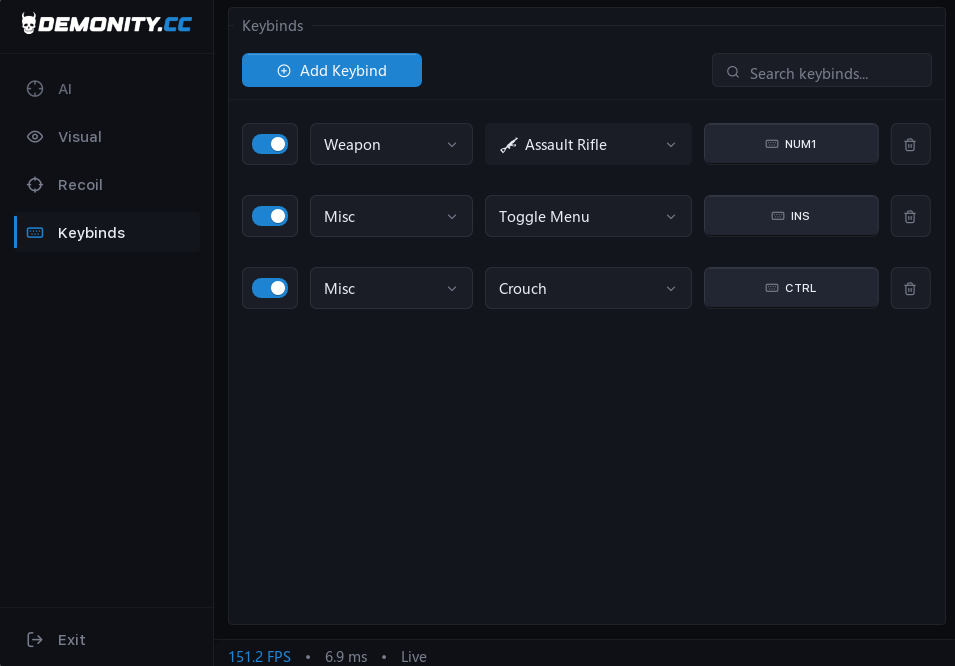
Keybinds
Add Keybind: Creates custom hotkeys for features.
Delete Keybind: Delete any keybind
Search Keybinds: Quick search bar for existing hotkeys.
Add Keybind: Creates custom hotkeys for features.
Delete Keybind: Delete any keybind
Search Keybinds: Quick search bar for existing hotkeys.
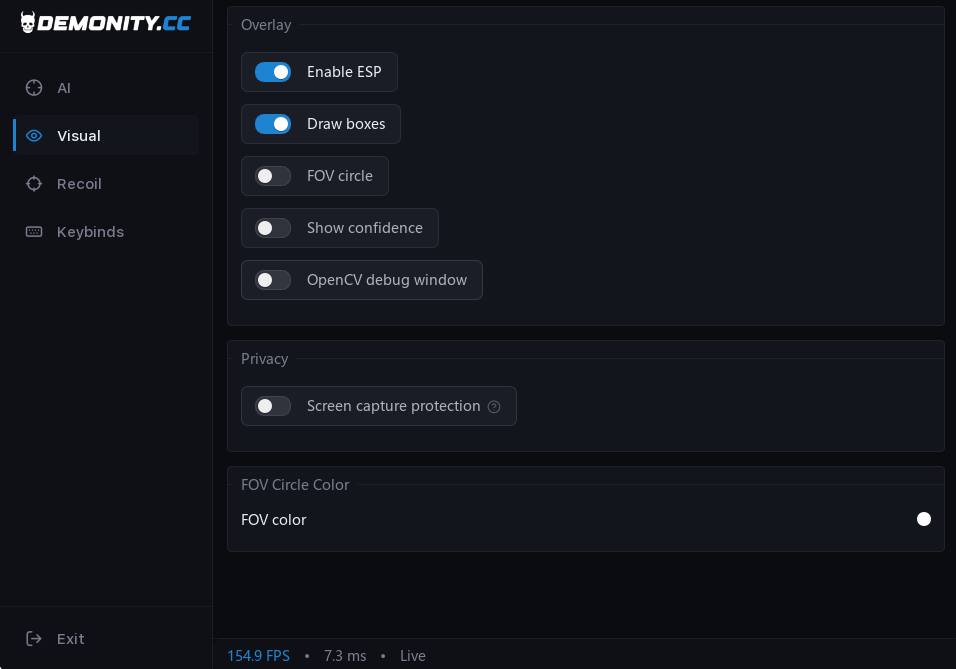
Visual Settings
Overlay:
Enable ESP: Globally toggles player ESP features.
Draw Boxes: Renders bounding boxes around targets.
FOV Circle: Displays the AI targeting radius on screen.
Show Confidence: Displays target detection percentage values on screen.
OpenCV Debug Window: Opens a background processing debug view.
Privacy:
Screen Capture Protection: Hides visual overlays during video recording or streaming.
FOV Circle Color:
FOV Color: Color picker to customize the FOV circle appearance.
Overlay:
Enable ESP: Globally toggles player ESP features.
Draw Boxes: Renders bounding boxes around targets.
FOV Circle: Displays the AI targeting radius on screen.
Show Confidence: Displays target detection percentage values on screen.
OpenCV Debug Window: Opens a background processing debug view.
Privacy:
Screen Capture Protection: Hides visual overlays during video recording or streaming.
FOV Circle Color:
FOV Color: Color picker to customize the FOV circle appearance.
No customer reviews yet
Once you have bought this product you can leave the first review right here.
Delivery is instant. Your licence key appears under My Orders as soon as payment completes, and is emailed to you as well.
Credit cards, bank transfers and cryptocurrencies are handled at checkout. For PayPal, join our Discord and our team will assist you.
Follow the setup guide, or reach our team 24/7 on Discord.